Just a note, to install knowledgetree CE on newer distributions, one needs to disable PHP5.3 and this can be accomplished on CentOS5 using:
# yum install knowledgetree --exclude="zend-server-php-5.3, mod-php-5.3-apache2-zend-server"
Just a note, to install knowledgetree CE on newer distributions, one needs to disable PHP5.3 and this can be accomplished on CentOS5 using:
# yum install knowledgetree --exclude="zend-server-php-5.3, mod-php-5.3-apache2-zend-server"
Seriously, there is something wrong with the Unifi setup at my office. While the line is currently working, it’s stability is in question. With a 37% packet loss to Google servers, there is definitely something going wrong here. I have made a report (1-1864549262) and this is the second time it is exhibiting the same unstable symptoms.
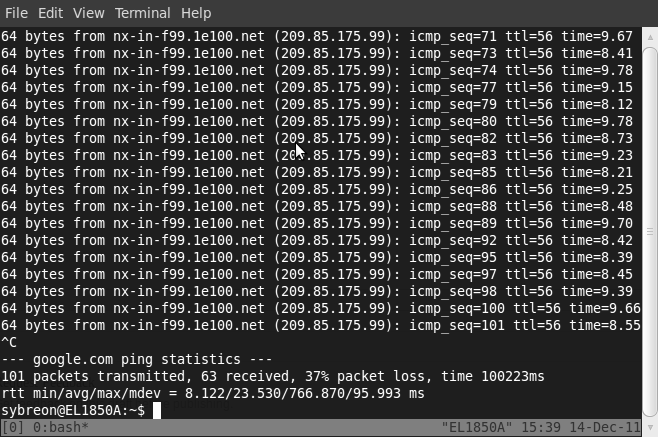
I’ve got even more ping results but they all reflect the same problem – about 40% packet loss. Even connecting to Google is a problem. And this is the Business package, where we are paying more for less service. I really do not understand why I always have these problems.
It took them a month to sort out my Streamyx problems previously too.
I’ve previously used a home router as a VPN gateway to my corporate network at AESTE. However, I’ve recently noticed that Ubuntu comes with its own PPTP client and I could use this instead while leaving the home router for devices that are not capable of connecting directly, such as a consumer NAS device at home.
I didn’t realise it but configuring it on Ubuntu was a snap. Just use the network manager and set the following settings:
VPN:

Connection Name: Any VPN

Gateway: ip of the PPTP server

User Name: CHAP username

Password: CHAP password
Advance:
Use Point-to-point encryption (MPPE): checked
IPV4 Settings:
Method: Automatic VPN
Routes:
Use this connection only for resources on its network: checked
Add in any necessary routes to reach your private network.
 Technical Intercourse