Sounds like a nice concept IDE.
Author: Shawn Tan
Chip Doctor, Chartered/Professional Engineer, Entrepreneur, Law Graduate.
8-bit Linux Machine
I respect the amount of dedication and genius that went into this effort. While nothing new, it’s totally CRAZY.
This project takes the Church-Turing thesis to an extreme. In essense, it states that “everything algorithmically computable is computable by a Turing machine.”
Some may wonder how he managed to get it all to work. So, let’s break it down a little:
CPU
According to the thesis, any CPU is able to emulate the operations of another CPU. So, while the AVR is an 8-bit micro, it can definitely be used to emulate all the complex functions available on the more powerful ARMv5 in software.
As an example, if I needed to do a 32-bit addition, all I would need to do is to do four 8-bit additions factoring in the Carry bits. So, depending on whether the 8-bit architecture supported a Add with Carry instruction, I might need to do an additional three 8-bit additions for a total of seven additions. In the end, I’d still end up with a 32-bit addition.
For many 8-bit microprocessors, there are already existing libraries to do such things because it is a fairly common requirement as 8-bit microprocessors find use in all sorts of unexpected applications where they might need to do 32-bit calculations anyway.
Take this analogy further, you can also do floating-point calculations emulated in software on a pure integer machine. This is done all the time, even on full fledged ARM architectures. In actual fact, all you’d need to build any computer in this world is a 1-bit computer.
RAM
This is where the 16KB RAM in the 8-bit micro has serious deficiencies. Linux would typically need several megabytes of RAM. Therefore, the project included an external 16MB of RAM. While some may argue that we still need more than 16MB of RAM, it isn’t exactly true. The internal 16KB would be used to emulate more of a cache than primary memory.
In a modern computer, memory is just a hierarchy of storage devices. RAM is just a convenient method of doing it. If there isn’t enough RAM, we can always emulate the RAM as well, using virtual memory, which is what most desktop PCs used to do in the past by exploiting some of the hard disk.
From all indications, this project had a 1GB SD card attached to it for storage needs. This included the Linux OS plus file-system. So, it could boot off this SD card and also use part of it as a swap if necessary. Swapping can both be done in the OS or even emulated by the 8-bit micro.
However, the speed of the device would be another limiting factor. Most 8-bit micro communicate with SD cards using the SPI protocol at a maximum clock of 25MHz. This means that it has a theoretical maximum transfer rate of only 3MB per second – about the speed of a 20x CD-ROM drive.
If I were adventurous, I might even emulate a CD-ROM drive. This way, I could run a Live-CD Linux distribution on one partition, while using another partition to emulate a mass storage device such as a hard-disk drive. That might prove interesting as well.
I/O
This is where I think that he had to emulate a lot more stuff. While 8-bit micros may be low on brain power, they are typically full of all sorts of I/O devices. However, the project would need to emulate a whole bunch of things to get Linux started.
I gather from the video that the standard inputs and outputs are routed through the serial port of the AVR. This can typically be done in Linux by simply specifying a kernel parameter console=/dev/ttyS0. Then, the emulator would need to emulate the necessary calls to read from and write to the console.
If he wanted to emulate the mouse and keyboard, it would also be very possible as the PS/2 protocols used have been emulated in 8-bit micros for a while. There are some devices that use 8-bit micros as pretend keyboards and mice e.g. a key-logger or a password dongle.
If he wanted to emulate a video card, it is also possible as 8-bit micros have been used to generate full frame video in emulation, largely by using PWM signals to emulate the analogue signals of a VGA connection. While it will be severely speed limited, it should be able to do at least a low-level VGA frame buffer.
He could even go as far as adding in ethernet if he so wished. Some 8-bit micros these days have built in ethernet MACs. However, adding USB host capability might be a bit tricky as most 8-bit micros do not have USB OTG capabilities as yet.
So, there we have it. A quick and dirty run-down of it.
AVR32 Arbitrary Width Fonts
I made some changes to the et024006dhu.c file today, to allow arbitrary sized fonts. The original driver in the Atmel Software Framework was not able to cleanly draw arbitrary sized fonts as it makes the assumption that there are only 8 columns in the font.
Edit the ASF file located in:
avr32/components/display/et024006dhu/et024006dhu.c
You need to change the two loops in the et024006_PrintString() function:
      for (row = y; row < (y + yfont); row++)

      {

        mask = 0x80;

        for (col = x; col < (x + xfont); col++)

        {

          if (*data & mask) // if pixel data then put dot

          {

            et024006_DrawQuickPixel( col, row, fcolor );

          }

          mask >>= 1;

        }

        // Next row data

        data++;

      }
Add in the couple of lines like this:
      for (row = y; row < (y + yfont); row++)

      {

        mask = 0x80;

        for (col = x; col < (x + xfont); col++)

        {

          if (mask == 0) { mask = 0x80; data++; }

          if (*data & mask) // if pixel data then put dot

          {

            et024006_DrawQuickPixel( col, row, fcolor );

          }

          mask >>= 1;

        }

        // Next row data

        data++;

      }
That’s it. This will allow the function to be used to print any arbitrary sized fonts as long as the custom font header is configured correctly.
Upstream git flow
I’ve been quite happily using git-flow for a while now. It’s a great way to structure and organise code management whether you are making commercial code or otherwise. However, I’ve recently had a need to fork an upstream repository and make local changes to it. However, I also need to track and keep updated with the changes upstream. So, this is my new flow:
Firstly, I’ll create an empty repository and initialise it for git-flow
$ mkdir repos.git

$ cd repos.git

$ git flow init

No branches exist yet. Base branches must be created now.

Branch name for production releases: [master]

Branch name for "next release" development: [develop]

How to name your supporting branch prefixes?

Feature branches? [feature/]

Release branches? [release/]

Hotfix branches? [hotfix/]

Support branches? [support/]

Version tag prefix? []
Next add the upstream remote and specify which remote branch to track, which we will use to pull changes in periodically.
$ git remote add upstream -t master git://sourceware.org/git/newlib.git

$ git fetch upstream
Then, merge the upstream code into the current development branch. Instead of merging the full upstream development, I prefer to merge the last stable release from upstream. This can be done by merging a specific tag identified by a specific commit point.
$ git checkout develop

$ git fetch upstream

$ git show-ref tag_name

$ git merge tag_hash
This should be done periodically to keep the local develop branch in-sync with upstream changes. Since I’m merging in the latest stable upstream code, I would recommend doing this whenever there are new stable versions from upstream.
Otherwise, just use git-flow as before and hopefully, things will hopefully work out automagically.
KnowledgeTree Community Edition
Just a note, to install knowledgetree CE on newer distributions, one needs to disable PHP5.3 and this can be accomplished on CentOS5 using:
# yum install knowledgetree --exclude="zend-server-php-5.3, mod-php-5.3-apache2-zend-server"
Unifi is Unstable
Seriously, there is something wrong with the Unifi setup at my office. While the line is currently working, it’s stability is in question. With a 37% packet loss to Google servers, there is definitely something going wrong here. I have made a report (1-1864549262) and this is the second time it is exhibiting the same unstable symptoms.
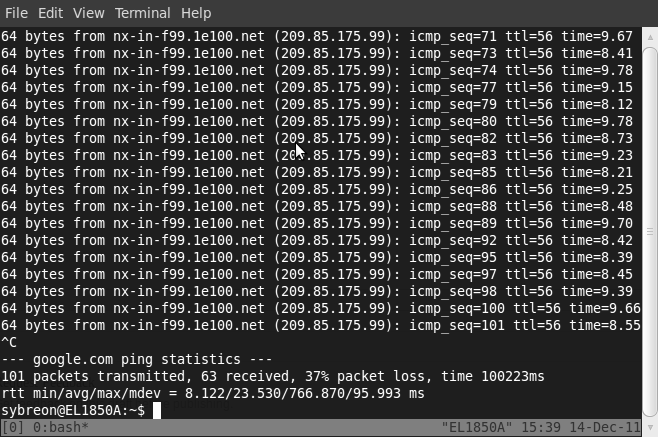
I’ve got even more ping results but they all reflect the same problem – about 40% packet loss. Even connecting to Google is a problem. And this is the Business package, where we are paying more for less service. I really do not understand why I always have these problems.
It took them a month to sort out my Streamyx problems previously too.
 Technical Intercourse